For laser cutters
Layered wall art,
cut right the first time.
Turn a drawing into a stack of laser-cut sheets that actually fit together. The studio works out the geometry, checks it against the board you are cutting, and hands you SVGs that open straight in your cutter.
$14.99 a month. Cancel whenever you like.
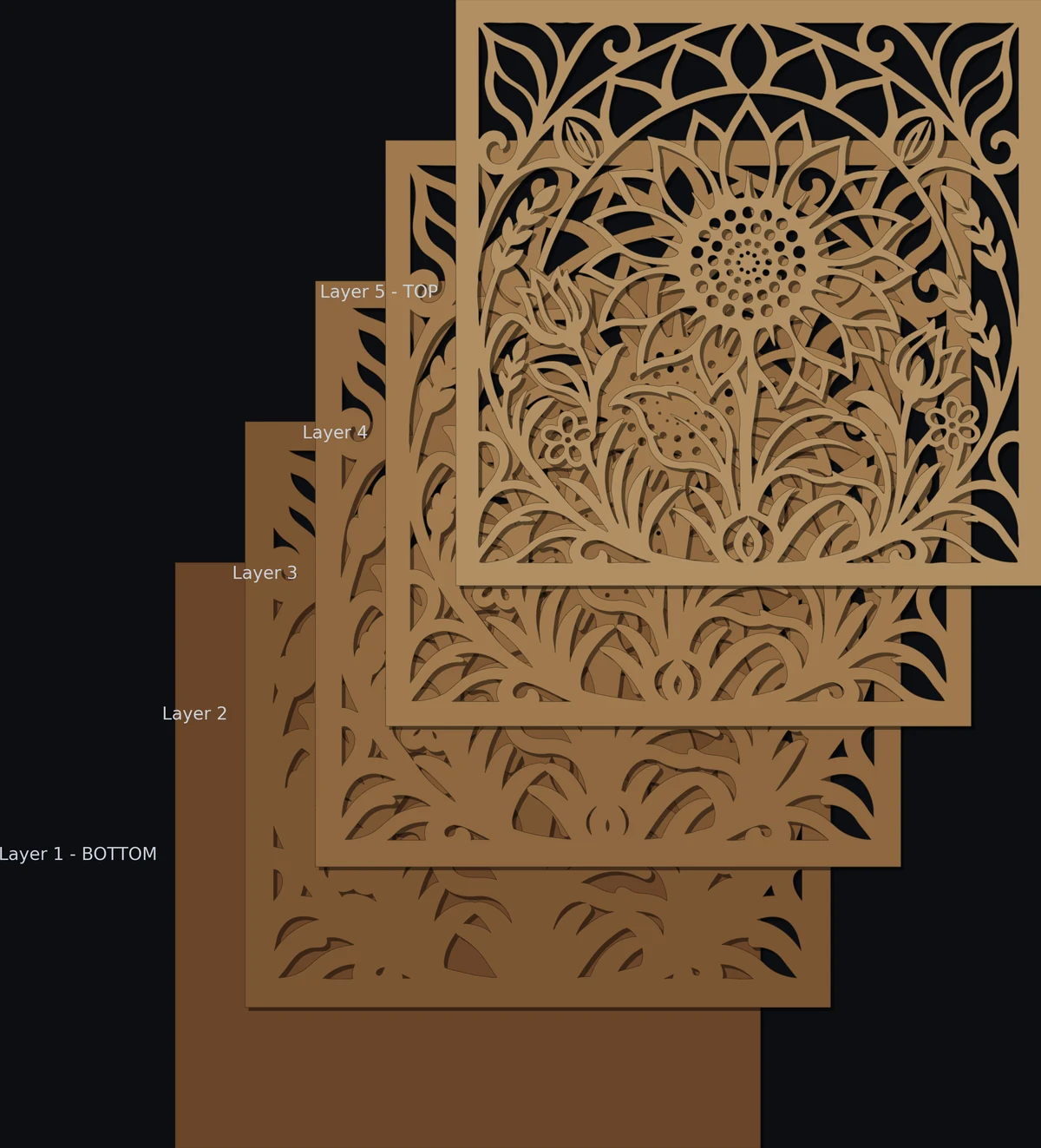
One drawing, as many sheets as you choose. Each one carries the design pulled in by a step.
Three stages, and on Studio only the picture can cost anything.
Bringing in your own artwork is free and an AI picture costs credits. On pay as you go, building a picture into layers costs 250 credits the first time; every rebuild of it after that is free.
Start with a drawing
Describe what you want and let the studio generate it, or upload artwork you already have. Black and white line work is what the cutter needs, and that is what comes out.
Clean it into a mask
Threshold, de-speckle and smooth until the mask says exactly which side is wood and which is air. Every control is live and the preview keeps up with it.
Build the stack
One sheet per layer, each carrying the same design pulled in by a step, all registered to a shared outline. Out come SVGs your cutter can open.
The hard part is not drawing it. It is making it cuttable.
Anything can generate a picture. Turning one into sheets that hold together on a bed of plywood is a geometry problem, and it is the one this studio solves.
It knows what your machine can cut
Minimum bridge width, minimum feature size, kerf, the narrowest slot the beam will clear. Every sheet is measured against your material and the ones that fail say where and by how much, in millimetres, before you waste a board.
Nothing falls out of the sheet
Material that would drop free gets a tab, automatically and in the fewest places. You can see every tab, refuse the ones you do not want, and cut away pieces you would rather lose.
The geometry is deterministic
Layer count, depth, step, panel shape, colours - change any of it and the picture rebuilds for free, with the same answer every time. On Studio every build is included; on pay as you go the first build of each picture is 250 credits, and every rebuild of it after that is free. Change your mind as often as you like.
Registered by construction
Every sheet shares one outer outline and one origin, so the stack lines up when it comes off the bed. No aligning by eye, no drift between layers.
Four things to make. Four of them today.
The difference between these is geometry, not styling - the first two are different answers to what sits on the sheet below, the third turns a photograph into an engraving, and the last is not a stack at all. We would rather ship what works than four that nearly do, and say plainly which is which.
Stepped Layers
AvailableThe whole design on every sheet, each opening pulled in one step deeper.
Every sheet carries the same artwork, and each one below has its openings inset by the layer step. Look into any opening and you see a ledge of every sheet beneath it. Registered by construction, predictable to cut, and the fastest way from a drawing to something on the wall.
Landscape Silhouette Layers
AvailableEach sheet an independent scene element, arranged so nothing hides what is behind it.
Not a stepped stack at all. Every sheet is its own shape - a ridge line, a treeline, a river - and the openings are placed so the sheet behind shows through rather than being covered. The hard part is depth ordering and occlusion: knowing what must stay clear on each sheet so the layer behind reads.
Vectorize a Photo
AvailableA photo in, an engraving out: AI pen and ink or line art, or a free dither.
Not a stack. Upload a photograph and choose how it becomes an engraving: an AI drawing of it, as a pen-and-ink engraving or as line art, or the photo itself as black-and-white dots, dithered on the server, free. The file comes out sized for the laser, carrying the width and DPI you set: the AI drawing itself, exactly as drawn, or the dither as 1-bit dots - and for line art an SVG of filled shapes too.
3D Project Creator
AvailableA template in, a sheet of flat parts out - slotted and tabbed to assemble.
Not a stack at all. Choose a template - a hexagonal lantern, a pen pot, a house - set its size and details, and what comes back is a cutting sheet of every part it takes to build it, with finger joints and slots already worked out so the pieces hold each other together. The hard part is not the drawing but the fit: tabs sized to the material thickness you are actually cutting, kerf taken off the right side of each edge, and a shape that can be assembled in an order that exists.
One plan opens everything the studio does today; the rest are in development. Making an account with no plan is Pay as you go, at nothing a month - every style that is available is open on it, and building a picture into layers costs 250 credits the first time.
Put a board on the bed.
One plan opens the whole studio. Credits are the only thing on top, and you buy those when you want them.